THE STICKERROAR GUIDE
Why Do Stickers Have a White Border?
A white border can separate artwork from its surroundings and provide space around the cut. Compare white margins, clear margins and edge-to-edge artwork before choosing your sticker.
Updated
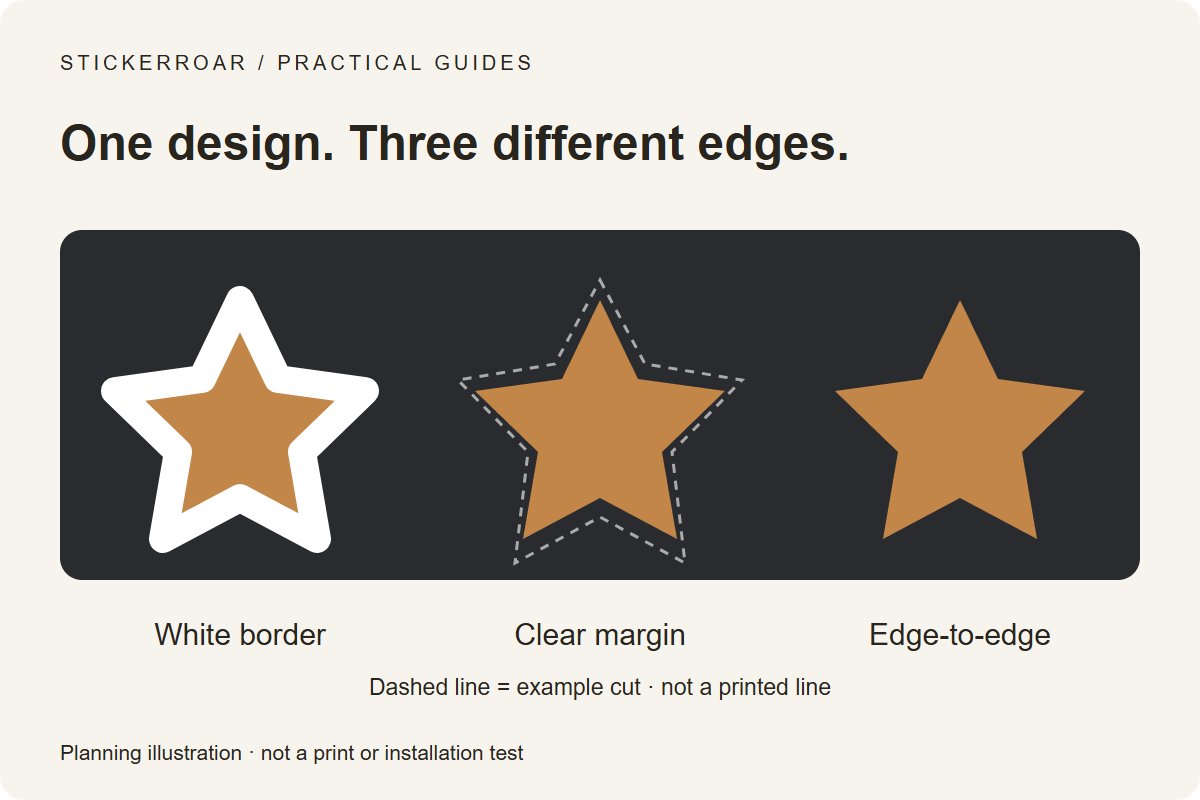
Planning diagram. View the full-size guide.
The short answer
A white border can make a design stand out from the surface behind it and leave space between the artwork and its outer cut. It is often a design choice, not a requirement for every sticker. A small cutting variation can also be less noticeable when important details sit away from the edge; a border does not guarantee perfectly centered cutting.
On white PVC, an unprinted margin can show the white base material. On Clear, a deliberately opaque white outline would require an appropriate white-ink specification. A white shape on your screen does not by itself confirm how that shape will be produced.
Three edges that look different
- White border: a visible light outline separates the graphic from its surroundings. On a dark surface it is part of the finished appearance, not empty space.
- Clear margin: transparent material extends beyond the print. The surface can show through, but the film edge and reflections may still be visible. Clear does not mean the material becomes invisible.
- Edge-to-edge color: the artwork continues to the intended cut. The production file may need bleed beyond that line; confirm the actual requirement before preparing the file.
The diagram uses the same simple artwork on the same dark background. Its dashed line is a cut-line illustration, not printed artwork or a production measurement. It is a planning diagram, not a photograph of our material.
Is the white edge intentional, or inside your file?
A clean, even outline in the approved design is different from an unwanted pale halo left by background removal. Inspect your PNG on a dark background using the transparency checker. If white pixels remain, they are still in the file; selecting Clear material does not automatically remove them.
Keep white eyes, lettering and highlights that belong to the artwork. When discussing a correction, specify whether you mean the outer border, a background rectangle or a pale fringe around individual details.
Choose the edge for your intended surface
A dark graphic on a dark panel may benefit from a light outline for contrast. A clear margin can suit an uncluttered design when the underlying surface is part of the intended look. Compare both options at the same size and on the actual background color.
Before approving production, confirm the outer cut dimensions, the visible border width, the treatment of small gaps and any white-ink coverage. The on-screen preview helps communicate the choice but is not a physical proof. Our material comparison explains the separate White PVC and Clear decision.
Preview your own design
Upload your artwork to review its outline and material preview, or browse custom car stickers for the request process. Note the edge you want in your order request. Final artwork, production and delivery details require confirmation; no online payment is collected.